Tabs Studio Blog (organizing Visual Studio document tabs)

January 23, 2010

Visual Studio 2010 Silver theme

Filed under: Uncategorized — Tags: , — Sergey Vlasov @ 3:24 pm

This month Matthew Johnson released the Visual Studio Color Theme Editor extension for Visual Studio 2010. This extension allows users to customize colors used by Visual Studio 2010 and contains three example themes (Autumn, Emerald and Silver):

Default Visual Studio 2010 theme

Default Visual Studio 2010 theme


Visual Studio 2010 Silver theme

Visual Studio 2010 Silver theme


Jameel Al-Aziz, in addition to his Tabs Studio 2010 style, has created Tabs Studio 2010 Silver theme style:
Tabs Studio 2010 Silver theme style

Tabs Studio 2010 Silver theme style


Get Tabs Studio 2010 Silver theme style by Jameel Al-Aziz (Visual Studio 2010 Beta 2 and Tabs Studio v1.7.6 or greater required).

January 8, 2010

Tabs Studio v1.7.11 is released

Filed under: Releases — Sergey Vlasov @ 12:33 pm

Tabs Studio v1.7.11 is released – added the Show tabs in a separate window option.

Tabs in a separate window

Filed under: Uncategorized — Sergey Vlasov @ 11:18 am

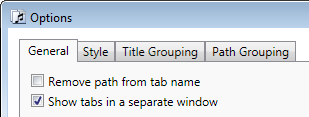
I’ve added a new option to show tabs in a separate window:

Show tabs in a separate window option

Show tabs in a separate window option


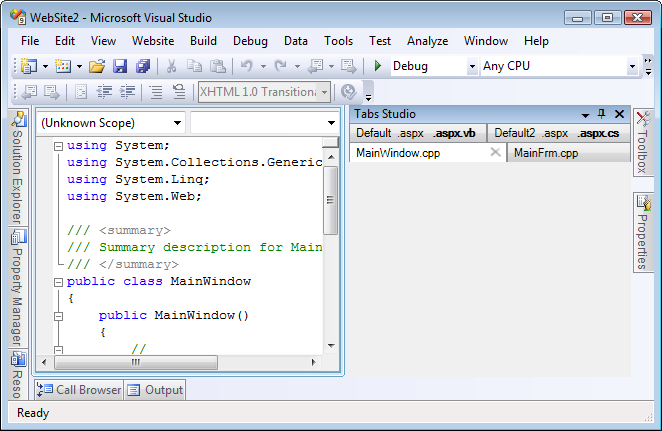
The separate window is a Visual Studio tool window that you can dock or float any place you like:
Tabs window on the right of code window

Tabs window on the right of code window


You set up tabs window width and height, Tabs Studio fits tabs into available width. Tabs window placement is saved by Visual Studio as for all other tool windows. If you have several tab groups, several tabs windows are opened.

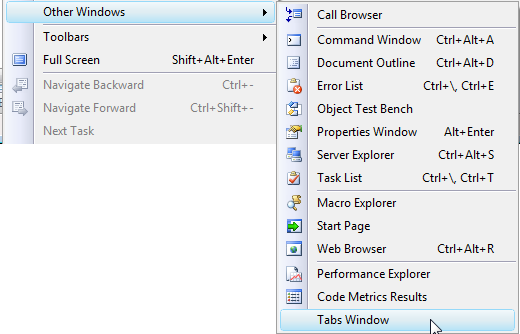
I’ve also added the TabsStudio.Connect.ShowTabsWindow command in case you (accidentally) have closed the window. You can add this command to the Visual Studio View menu for example:

The show tabs window command added to VS View menu

The show tabs window command added to VS View menu


The Show tabs in a separate window option is currently not supported in MDI mode and in VS 2010.

January 4, 2010

Tabs Studio v1.7.10 is released

Filed under: Releases — Sergey Vlasov @ 8:42 pm

Tabs Studio v1.7.10 is released – added the Maximum number of tabs in a group option, changed empty tab grouping regex options to mean “disable tab grouping”, fixed rare unhandled exception in SSMS query designer.

Maximum number of tabs in a group

Filed under: Uncategorized — Sergey Vlasov @ 8:10 pm

In SSMS sometimes you can get 10 or even more tabs in one group. A group like this takes lot of space and can be hard to manage. I’ve added the Maximum number of tabs in a group option that breaks extra large groups:

Maximum number of tabs in a group option

Maximum number of tabs in a group option


Default value is 7. For example, 9 SQL queries are now organized in two groups instead of a large one:
SQL query tabs organized in two groups

SQL query tabs organized in two groups


Setting the Maximum number of tabs in a group option to 0 allows any number of tabs to be combined in one group.

January 2, 2010

Tab text options in SSMS

Filed under: Uncategorized — Tags: — Sergey Vlasov @ 11:50 am

Microsoft SQL Server Management Studio 2008 has several built in tab text options:

Tab text options in SSMS 2008

Tab text options in SSMS 2008


You can shorten tabs by omitting parts like server name or login name – SQLQuery1.sql was created with default settings, SQLQuery3.sql was created with database, login and server names off. These options don’t exist in SSMS 2005.

December 28, 2009

Disabling tab grouping

Filed under: Uncategorized — Sergey Vlasov @ 11:17 am

Currently, if you try to disable tab grouping by emptying Title grouping regex or Path grouping regex it doesn’t work – empty regex is interpreted as “use default settings”. It is safe, but counterintuitive and for the next Tabs Studio version I’ve changed empty regex to mean “disable tab grouping”. If you want to disable tab grouping in the current version – write something non-capturing like “don’t group” as a regex.

If you enter invalid regex (e.g. “?” that shows the error parsing “?” – Quantifier {x,y} following nothing) and save it, then, again, default settings are used for tab grouping. I think safety of default settings is still valuable here.

December 25, 2009

Tabs Studio v1.7.9 is released

Filed under: Releases — Sergey Vlasov @ 9:07 am

Tabs Studio v1.7.9 is released – created new title grouping rules for SSMS, organized separate settings storage for SSMS, added Remove path from tab name option functionality for SSMS, added support for SSMS table paths, added version information to the VS About window, fixed windows shift in VS 2005 and SSMS, fixed rare tab non grouping after renaming a document.

December 24, 2009

SSMS tab grouping

Filed under: Uncategorized — Tags: — Sergey Vlasov @ 10:00 pm

SQL Server Management Studio uses quite different scheme for tab names from Visual Studio. Here is the screenshot of default tab names (I temporarily configured Tabs Studio to not group tabs):

No tab grouping

No tab grouping

I’ve significantly improved SSMS support in the next Tabs Studio version:

1. Separate settings for SSMS.

Now SSMS 2005/2008, VS 2005/2008 and VS 2010 have separate settings. You can customize each of the three product lines independently.

2. Remove path from tab name works for SSMS.

Turning on the Remove path from tab name option strips parentheses and removes path from tab names in SSMS now:

Remove path from tab name in action

Remove path from tab name in action

3. Special title grouping rules for SSMS out of the box.

Tabs Studio now uses new default title grouping rules when running in SSMS that both group tabs and strip parentheses:

Tab grouping (default)

Tab grouping (default)

4. Support for SSMS table paths.

Documents representing tables in SSMS have document paths like “Server[@Name=’COMP1′]/Database[@Name=’ReportServer’]/Table[@Name=’ActiveSubscriptions’ and @Schema=’dbo’]”. Tabs Studio now applies path grouping rules to these paths as well.

Update: Tabs Studio v1.7.9 with these changes is ready for download.

December 2, 2009

Tabs Studio review by Scott Mitchell in MSDN Magazine

Filed under: Uncategorized — Sergey Vlasov @ 2:40 pm

“Unlike Visual Studio, Tabs Studio displays the tab for every open document in both the SDI and MDI configurations. If there is not enough horizontal space to display every tab, Tabs Studio stacks them vertically.” Read full review.

« Newer PostsOlder Posts »

Blog at WordPress.com.