Yesterday Visual Studio 2010 was released:
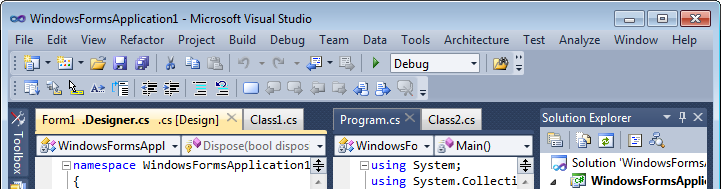
I don’t see any changes in default VS tabs behavior comparing to RC. I’ve tested Tabs Studio v1.9.0 with VS Professional, Premium and Ultimate 2010 RTM editions and everything worked just fine.
Yesterday Visual Studio 2010 was released:
I’ve changed selected tab colors to match the default VS 2010 theme – yellow for active, dark blue for inactive and grey for unfocused:
I’ve added the close file button to each extension. It should be particularly useful in SSMS where you more often need to close a file rather than a whole tab:
<Style TargetType="TabsStudio:TabExtensionCloseButton" BasedOn="{StaticResource DefaultTabExtensionCloseButton}">
<Style.Triggers>
<Trigger Property="IsTabSelected" Value="True">
<Setter Property="Visibility" Value="Visible"/>
</Trigger>
</Style.Triggers>
</Style>
<Style TargetType="TabsStudio:CloseTabButton" BasedOn="{StaticResource DefaultCloseTabButtonStyle}">
<Style.Triggers>
<Trigger Property="IsMultiExtensions" Value="True">
<Setter Property="Visibility" Value="Collapsed"/>
</Trigger>
</Style.Triggers>
</Style>
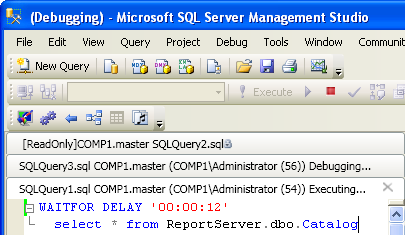
Tabs Studio v1.9.1 is released – added support for Debugging and Executing tab states in SQL Server Management Studio, added ReadOnly tab title text cleanup in SSMS.
SQL Server Management Studio adds the [ReadOnly] prefix to the window title for read only scripts. It also adds Debugging… and Executing… suffixes when SQL scripts are debugged and executed:
Tabs Studio v1.9.0 public is released – comparing to v1.8.5: fixed inability to display identical extensions in a tab group, removed unnecessary access to Visual Studio documents on tabs update.
Reminder for those upgrading from v1.8.0: previous versions of Navigator, Saver and Sorter add-ins don’t work with Tabs Studio v1.8.3 and greater. Here are the updated versions: Navigator v1.0.1, Saver v1.0.1, Sorter v1.0.2.
Tabs Studio v1.8.5 is released – fixed the Remove path from tab name option for SSMS broken in v1.8.2, changed installer to leave disabled Tabs Studio state in SSMS on upgrade, fixed 2 pixels tabs overflow over a code window in SSMS, fixed occasional 1 pixel dark line under the tabs.
I’ve prepared two tab context menu translations for German and Spanish localized Visual Studio editions:
Tabs Studio v1.8.3 is released – added two additional tabs layouts: Wrap and Stack.
Previous versions of Navigator, Saver and Sorter add-ins don’t work with Tabs Studio v1.8.3. Here are the updated versions: Navigator v1.0.1, Saver v1.0.1, Sorter v1.0.2.
I’ve added two additional tabs layouts – Wrap and Stack: