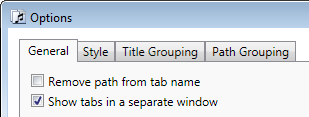
Since the beginning, Tabs Studio didn’t group e.g. WebDataService.cs and WebdataService.svc because of the case difference. It was my conscious decision to indicate an inconsistence and prompt a developer to fix it. But now I think there is no harm to provide an option and give you full control of this behavior:
February 11, 2010
Grouping titles ignoring case differences
February 10, 2010
Visual Studio 2010 RC
This week Visual Studio 2010 Release Candidate was released:
I don’t see any changes in default tab behavior comparing to Beta 2 in this release. I’ve tested Tabs Studio v1.8.0 with Professional, Premium and Ultimate 2010 RC editions and everything worked as good as in Beta 2. Interestingly, the Load per user extensions when running as administrator VS option is now on by default.
Tab names in a database project
Visual Studio has a special project type – Database Project. Tab names in such project include a path with back slashes:
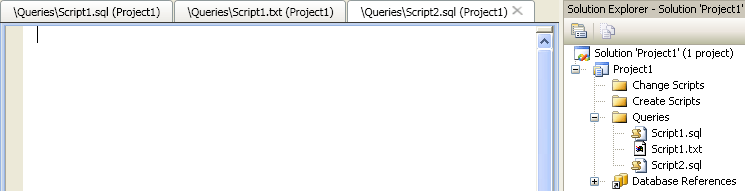
To support back slashes I’ve changed the default Title grouping regex to (?<Name>(.*[/\\])?.+?)(?<Ext>\..+) and I’ve changed the default remove path transform to ^(.*[/\\\\])?(.*)$. With these changes selecting the Remove path from tab name option successfully removes paths:
It would be nice to remove trailing Project1 as well. (?<Name>(.*[/\\])?.+?)(?<Ext>\..+) \(Project1\) helps, but only for grouped titles like Script1. I’ve made additional changes in Tabs Studio and now single titles are affected by Title grouping regex too:

For more advanced title customization there is TitleTransform available in add-ins.
February 7, 2010
Decorator update
Decorator add-in v1.0.0 was found guilty in disrupting Visual Studio operations, even causing a crash. It too often looked for a project associated with a window, particularly disrupting when the window was already closed.
I’ve added a dictionary to store a project for a tab. Now the project is searched in Visual Studio only once when the tab is created. You may also notice in source code how I use tab.TabItem for tab identity – this is because TabsStudioExt.Tab objects are created at will and only WPF controls and DTE objects are stable enough for identity purposes.
Download Decorator v1.0.1.
February 1, 2010
New blog address
I’ve established the new address for this blog – http://blog.tabsstudio.com. Everything else is the same.
January 31, 2010
Tabs Studio on Twitter
I’ve created the Twitter account for Tabs Studio where I plan to write about the lesser details than on this blog.
Follow Tabs Studio on Twitter!
January 27, 2010
Tabs Studio toolbar
I’ve created the default toolbar for Tabs Studio that includes Options, Add-in manager, Previously selected tab, Open corresponding file, Tabs window and About commands:
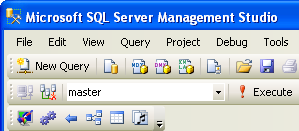
This toolbar is also available in SSMS (though you need to manually make it visible):
I plan to make the toolbar available in Visual Studio 2010 closer to its release date.
January 23, 2010
Visual Studio 2010 Silver theme
This month Matthew Johnson released the Visual Studio Color Theme Editor extension for Visual Studio 2010. This extension allows users to customize colors used by Visual Studio 2010 and contains three example themes (Autumn, Emerald and Silver):
Jameel Al-Aziz, in addition to his Tabs Studio 2010 style, has created Tabs Studio 2010 Silver theme style:
Get Tabs Studio 2010 Silver theme style by Jameel Al-Aziz (Visual Studio 2010 Beta 2 and Tabs Studio v1.7.6 or greater required).
January 8, 2010
Tabs in a separate window
I’ve added a new option to show tabs in a separate window:
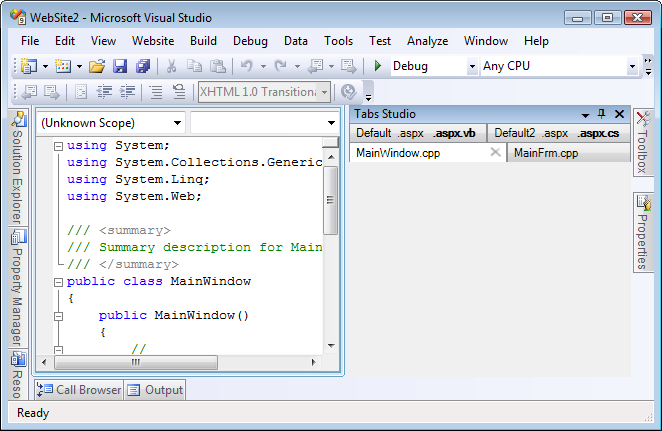
The separate window is a Visual Studio tool window that you can dock or float any place you like:
You set up tabs window width and height, Tabs Studio fits tabs into available width. Tabs window placement is saved by Visual Studio as for all other tool windows. If you have several tab groups, several tabs windows are opened.
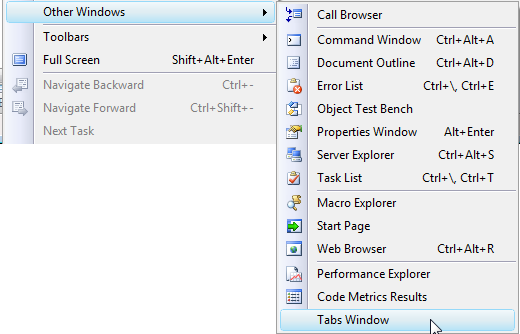
I’ve also added the TabsStudio.Connect.ShowTabsWindow command in case you (accidentally) have closed the window. You can add this command to the Visual Studio View menu for example:
The Show tabs in a separate window option is currently not supported in MDI mode and in VS 2010.
January 4, 2010
Maximum number of tabs in a group
In SSMS sometimes you can get 10 or even more tabs in one group. A group like this takes lot of space and can be hard to manage. I’ve added the Maximum number of tabs in a group option that breaks extra large groups:
Default value is 7. For example, 9 SQL queries are now organized in two groups instead of a large one:
Setting the Maximum number of tabs in a group option to 0 allows any number of tabs to be combined in one group.