Tabs Studio v5.4.0 released:
- Added support for SQL Server Management Studio 20.
- Removed “Toggle Multiple Rows with Mouse Wheel” from VS 2022 tab context menu.
Download link: Tabs Studio v5.4.0.
Tabs Studio v5.4.0 released:
Download link: Tabs Studio v5.4.0.
You can install Tabs Studio v5.3.0 on Visual Studio 2022 Arm64 with this installer: https://tabsstudio.com/download/TabsStudioVS2022_ARM64_530.vsix
Tabs Studio v5.2.0 released:
Download link: Tabs Studio v5.2.0.
Tabs Studio v5.1.2 released:
Download link: Tabs Studio v5.1.2.
Tabs Studio v5.1.0 released:
Download link: Tabs Studio v5.1.0.
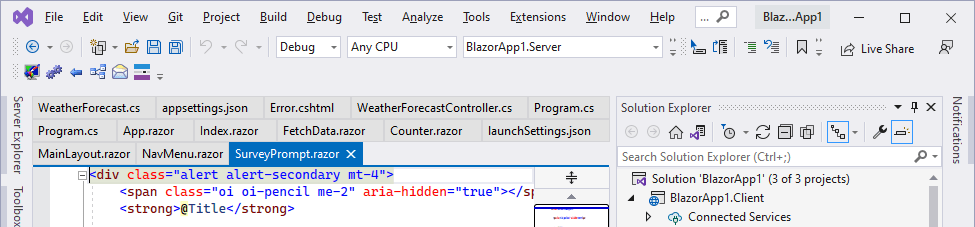
In Tabs Studio, tabs expand to fill available row space (unless it is the last row of tabs). This is how it looks in VS 2022:
I’ve added the new ShortTabs property that prevents tab expansion:
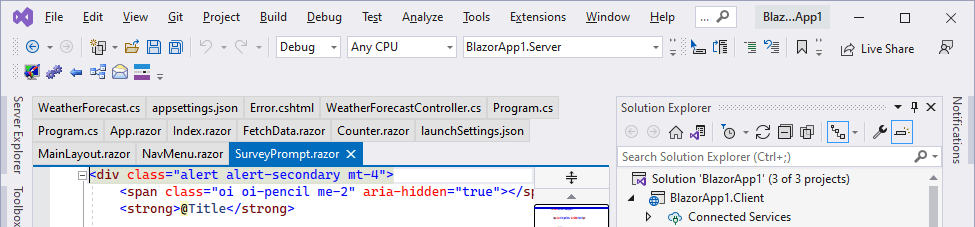
You can enable it with the following style:
<Style TargetType="TabsStudio:Tabs" BasedOn="{StaticResource DefaultTabsStyle}">

  <Setter Property="ShortTabs" Value="True"/>

</Style>
Download link: Tabs Studio v5.0.2.
Tabs Studio v5.0.0.1 fixes EnvDTE FileNotFoundException in Visual Studio 2022 Preview 2.1.
Download link: Tabs Studio v5.0.0.1.
Tabs Studio v5.0.0 released:

Tabs Studio in Visual Studio 2022
Download link: Tabs Studio v5.0.0.

 Tabs Studio Blog (organizing Visual Studio document tabs)