Tabs Studio v1.3.1 is released – fixed assertion failure when closing Web Browser window (and windows based on Web Browser such as Integrated Help and Samples) using Window.CloseDocumentWindow keyboard command or using Window – Hide menu command.
June 3, 2009
June 2, 2009
Tabs Studio v1.3.0 is released
Tabs Studio v1.3.0 public is released – fixed accidental tab drag on tab selection when number of toolbars changes, added .inl to the list of combinable extensions.
Comments Off on Tabs Studio v1.3.0 is released
May 31, 2009
Tabs Studio v1.2.6 is released
Tabs Studio v1.2.6 is released – added ability to open corresponding files.
Comments Off on Tabs Studio v1.2.6 is released
Open Corresponding File command
I’ve added the ability to conveniently open corresponding files. For example, having stdafx.h opened you can now quickly open stdafx.cpp and vice versa. It works for all combinable extensions that Tabs Studio supports.
Open corresponding file command was added to the top of the tab’s context menu:
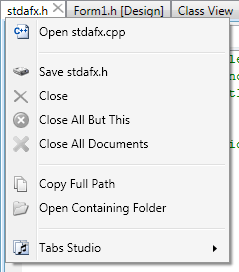
Open corresponding file command in context menu
There could be multiple corresponding files to select from:
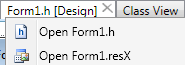
Multiple corresponding files
TabsStudio.Connect.OpenCorrespondingFile Visual Studio command was also added to be available for keyboard binding. This command looks for all available corresponding files relevant to the currently selected tab and opens first one from the list. If all corresponding files are already opened, OpenCorrespondingFile activates next extension as NextTabExtension command does. Having standard h/cpp pair this behavior allows you to hit OpenCorrespondingFile shortcut and get to a corresponding file no matter if it is currently opened or not.
Comments Off on Open Corresponding File command
May 29, 2009
IE downloading fixed
There was a problem downloading Tabs Studio installer using Internet Explorer – IE changed vsi extension to zip. It is fixed now.
Comments Off on IE downloading fixed
Tabs Studio v1.2.5 is released
Tabs Studio v1.2.5 is released – added horizontal and vertical tab groups support, added .aspx.vb to the list of combinable extensions, fixed tab from moving to the last position on read only status change.
Comments Off on Tabs Studio v1.2.5 is released
Horizontal and vertical tab groups
Visual Studio supports horizontal and vertical tab groups and Tabs Studio now backs it up too. When you have two or more tabs open, use Visual Studio’s Window menu to create a new group:
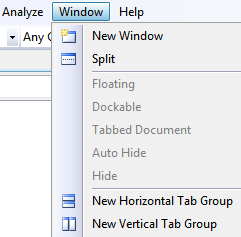
New Horizontal/Vertical Tab Group commands
You can have as much groups as you want, but you can’t mix horizontal and vertical groups:

Three vertical tab groups
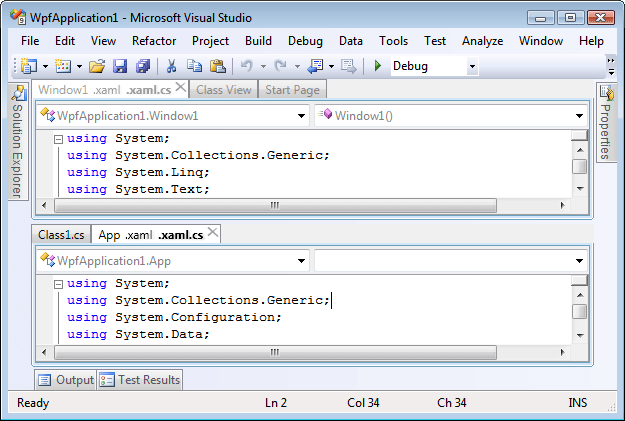
Two horizontal tab groups
IsGroupSelected property is added to all Tabs Studio controls to style inactive group. Default style sets text opacity for not selected group to 60%.
To move tabs between groups use Move to Next/Previous Tab Group tab context menu commands:
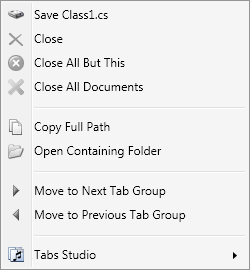
Move to Next/Previous Tab Group context menu commands
Comments Off on Horizontal and vertical tab groups
May 21, 2009
Window tabs in Visual Studio 2010 Beta 1
Let’s see what’s new in Visual Studio 2010 Beta 1 for tabs management comparing to Visual Studio 2008:

Visual Studio 2008 tabs

Visual Studio 2010 tabs
Close tab button is now on the selected tab. Close button is also become visible when mouse is over a non selected tab:

Tab background on mouse over
Notice that not showing close tab button on non selected tabs doesn’t save horizontal space as place for close tab button is always reserved.
Context menu for document tab now has a Float command that allows document window to leave bounds of Visual Studio 2010 workspace:
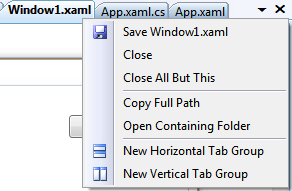
VS08 context menu for document tab

VS10 context menu for document tab
The same floating as it was allowed for non document windows in Visual Studio 2008 (open link in new tab to enlarge):
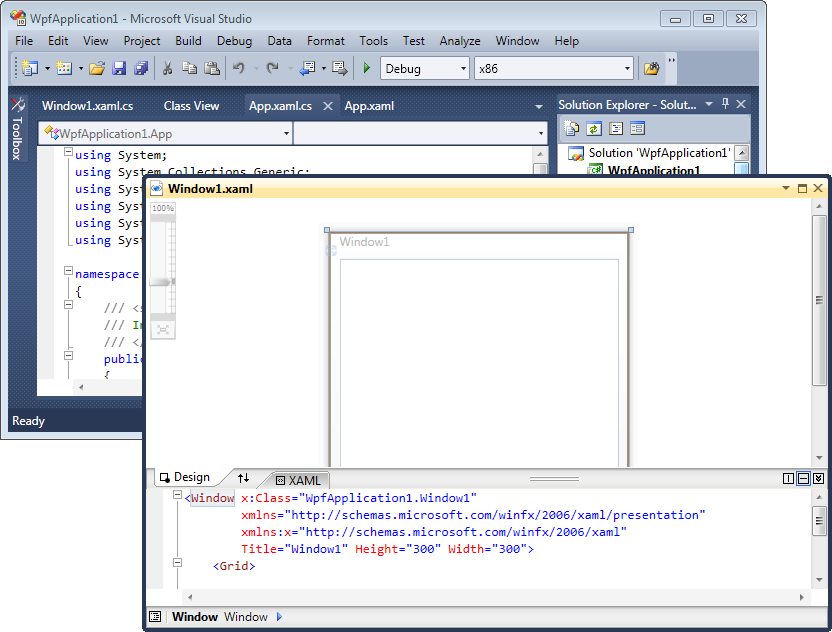
Floating Window1.xaml out of Visual Studio 2010 main window
Visual Studio 2010 doesn’t have Multiple documents Window layout option (aka MDI) any more:
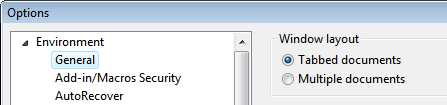
VS08 general options
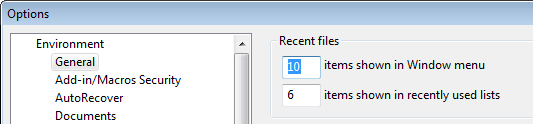
VS10 general options
Everything else is the same in VS10: there is only one row of tabs, new tabs are opened on the left, when tabs don’t fit the available space they are hidden, when hidden tab is selected it goes to the left corner, tab names for ASP.NET projects contain full path.
Update – Noah Coad has blogged about a registry setting to open tabs to the right in VS 2010:
[HKEY_CURRENT_USER\Software\Microsoft\VisualStudio\10.0\General]
"DocumentDockPreference"=dword:00000001
Finally, some words about Tabs Studio support for VS10. Underlying tabs and windows implementation in Visual Studio 2010 is now WPF based, no more Win32 windows. Tabs Studio’s injection subsystem need to be rewritten to accommodate for this changes.

Tabs Studio v1.2.0 is released
Tabs Studio v1.2.0 public is released – no changes comparing to v1.1.6.
Comments Off on Tabs Studio v1.2.0 is released
May 20, 2009
Tabs Studio v1.1.6 is released
Tabs Studio v1.1.6 is released – added Save, Floating, Dockable and Close All Documents commands to tab’s context menu; added tooltip for non document tabs.
This is kind of v1.2.0 Release Candidate.
Comments Off on Tabs Studio v1.1.6 is released

 Tabs Studio Blog (organizing Visual Studio document tabs)