Tabs Studio Blog (organizing Visual Studio document tabs)

August 8, 2009

Running Tabs Studio from a network share

Filed under: Uncategorized — Sergey Vlasov @ 10:37 am

Tabs Studio installs to a subdirectory in the user’s My Documents directory. By default My Documents directory is on the system disk, but it can be changed to point to another disk or network share:

Network share target in My Documents properties

Network share target in My Documents properties


If My Documents was set to a network share and you run Tabs Studio v1.5.0 installer you get “Tabs Studio requires Visual Studio 2005, Visual Studio 2008 or Visual Studio 2010 installed” error message:
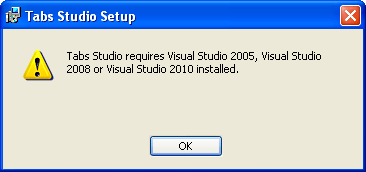
Tabs Studio Setup cannot detect Visual Studio installation

Tabs Studio Setup cannot detect Visual Studio installation


This problem in the installer is fixed in Tabs Studio v1.5.1. Installer v1.5.1 correctly installs Tabs Studio, but when you run Visual Studio you get “Error number: 80131417”:
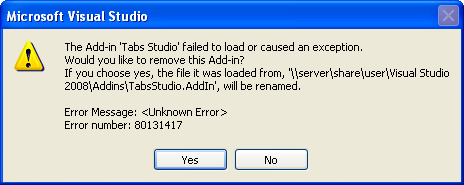
Tabs Studio add-in failed to load with error 80131417

Tabs Studio add-in failed to load with error 80131417


A .NET dll running from a network share has less permissions than a dll running from a local disk (even with the .NET 3.5 SP1 changes). You need to add a new code group for the Addins directory with FullTrust to the “Code Access Security Policy”. Run the following single line command with admin rights:

C:\WINDOWS\Microsoft.NET\Framework\v2.0.50727\CasPol.exe -m -ag All_Code -url "file://\\server\share\user\Visual Studio
 2008\Addins\*" FullTrust -n "VisualStudio2008Addins" -d "Visual Studio 2008 Add-ins"

Now after Visual Studio restart Tabs Studio should run just fine (you may need to re-enable it on startup in Tools – Add-in Manager).

To remove FullTrust from the Addins directory when you don’t need it any more, run the following command with admin rights:

C:\WINDOWS\Microsoft.NET\Framework\v2.0.50727\CasPol.exe -m -rg "VisualStudio2008Addins"

Update: Uninstallation of v1.5.1 doesn’t work if the computer’s System account doesn’t have read access to the Addins directory on network share.

Update 2: If the computer’s System account doesn’t have read access to the Addins directory you can manually delete TabsStuido.dll, TabsStudio.AddIn files and Microsoft.VC90.CRT directory from it. After that uninstallation or newer version installation works fine.
August 7, 2009

Tabs Studio review by Tim Heuer

Filed under: Uncategorized — Sergey Vlasov @ 2:29 am

“Very cool. So far this little add-in is helping me just a tad more productive and it stays out of my way!” Read full review.

August 1, 2009

Tabs Studio v1.5.0 is released

Filed under: Releases — Sergey Vlasov @ 11:51 am

Tabs Studio v1.5.0 public is released – no changes comparing to v1.4.8.

July 30, 2009

Tabs Studio v1.4.8 is released

Filed under: Releases — Sergey Vlasov @ 5:55 am

Tabs Studio v1.4.8 is released – added MDI mode support, changed tab closing and tab context menu opening from mouse button down to mouse button up event.

Mouse button down vs. mouse button up

Filed under: Uncategorized — Sergey Vlasov @ 5:01 am

Mouse click consists of two actions – pressing a button and releasing the button. Associated mouse click action can be initiated by either of these two events. Let’s see how mouse clicks are processed in Tabs Studio.

Left click to select tab. Currently Tabs Studio selects tab on mouse button down and this is standard Windows shell behavior. OK.

Left click on close tab button. Currently Tabs Studio closes tab on mouse button down. For a button standard Windows shell behavior is to initiate button action on mouse up. I’m changing Tabs Studio behavior to close tab on mouse button up.

Right click to open tab context menu. Currently Tabs Studio opens menu on mouse button down. Most Windows applications (VS, IE, Explorer) open context menu on mouse button up. I’m changing Tabs Studio behavior to open context menu on mouse button up.

Middle click to close tab. Currently Tabs Studio closes tab on mouse button down. Standard Windows shell applications don’t use middle button. Other applications behave both ways. Firefox closes tab on mouse button up. IE 8 closes tab on mouse button down. VS 2008 closes tab on mouse button up. VS 2010 Beta 1 closes tab on mouse button down. I think closing on mouse button up is better as it allows canceling closing: if after pressing the middle mouse button on a tab you realized that you don’t want to close it you can move mouse off the tab holding the middle mouse button. I’m changing Tabs Studio behavior to close tab on mouse button up.

July 29, 2009

MDI mode support

Filed under: Uncategorized — Sergey Vlasov @ 5:19 am

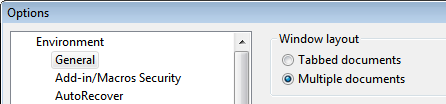
Visual Studio 2005 and Visual Studio 2008 support multiple documents window layout:

Multiple documents layout option in Visual Studio

Multiple documents layout option in Visual Studio


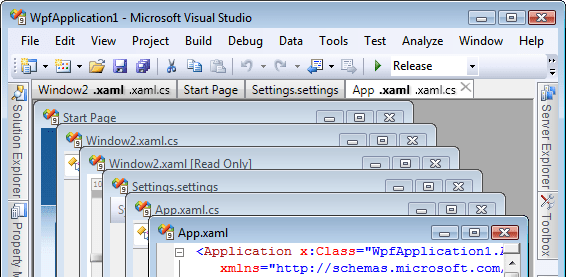
I’ve added Tabs Studio tabs to this mode too:
Tabs Studio tabs in MDI mode

Tabs Studio tabs in MDI mode

July 27, 2009

Tabs Studio v1.4.7 is released

Filed under: Releases — Sergey Vlasov @ 6:38 am

Tabs Studio v1.4.7 is released – created single msi installer for all supported Visual Studio versions (2005, 2008 and 2010 Beta 1).

July 23, 2009

Tabs Studio review by smartyP

Filed under: Uncategorized — Sergey Vlasov @ 3:09 pm

“When I installed Tabs Studio I thought it was a cool idea, but after using it the last 2 weeks I’m hooked.” Read full review.

Unified installer

Filed under: Uncategorized — Sergey Vlasov @ 3:52 am

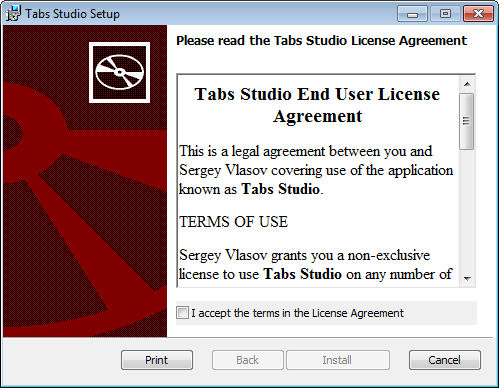
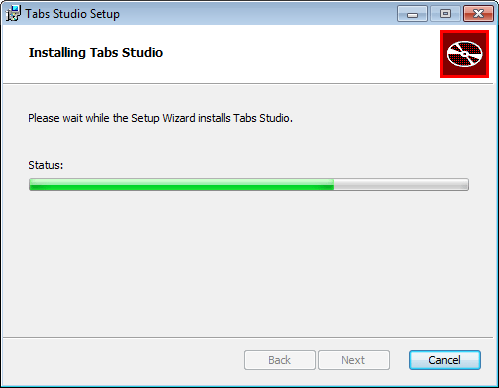
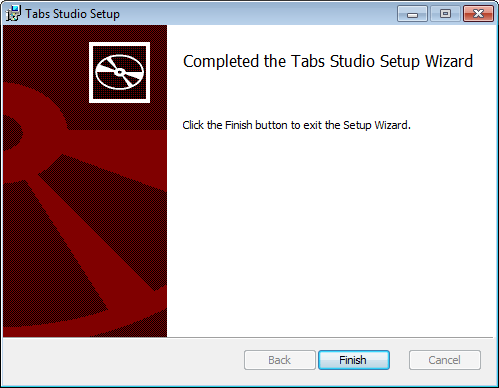
I’m working on a single msi installer for all supported Visual Studio versions (2005, 2008 and 2010 Beta 1). You run TabsStudio.msi, click I accept, click Install, installer installs Tabs Studio for the current user for all supported Visual Studio versions installed, you click Finish and that’s all:

Tabs Studio Setup Step 1

Tabs Studio Setup Step 1


Tabs Studio Setup Step 2

Tabs Studio Setup Step 2


Tabs Studio Setup Step 3

Tabs Studio Setup Step 3

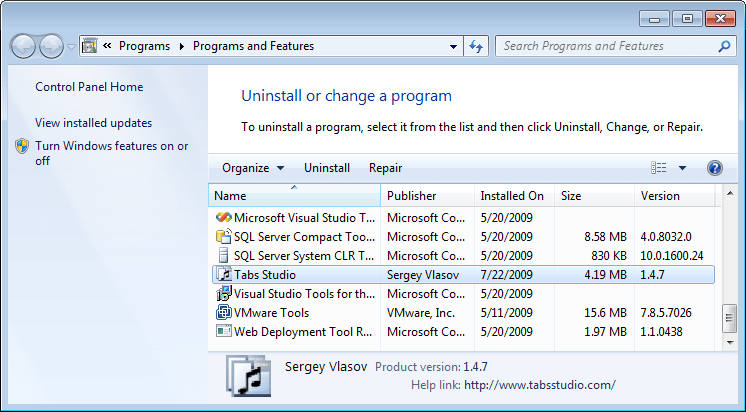
Installing a new Tabs Studio version over existing one looks exactly the same. Installation doesn’t require admin rights or elevation. To uninstall Tabs Studio go to the standard Control Panel applet:

Control Panel Programs and Features with Tabs Studio Installed

Control Panel Programs and Features with Tabs Studio Installed

July 19, 2009

Tabs Studio v1.4.5 for Visual Studio 2010 Beta 1 is released

Filed under: Releases — Tags: — Sergey Vlasov @ 3:42 pm

Tabs Studio installer for Visual Studio 2010 Beta 1 is a separate installer and consists of two modules: Tabs Studio 2010 v1.4.5 and Tabs Studio 2010 Helper v1.0.0. Trial period for this build lasts up to January 1, 2010.

« Newer PostsOlder Posts »

Blog at WordPress.com.