Tabs Studio Blog (organizing Visual Studio document tabs)

August 24, 2009

More tab events

Filed under: Uncategorized — Tags: — Sergey Vlasov @ 3:25 am

I’ve added more events to the ITabsStudioEngine interface:

TabExtensionCreated, TabExtensionDestroyed and TabExtensionRenamed events with TabExtensionEventArgs argument containing TabExtension, Tab and Tabs properties.

TabCreated, TabDestroyed and TabRenamed events with TabEventArgs argument containing Tab and Tabs properties.

TabsCreated and TabsDestroyed events with TabsEventArgs argument containing Tabs property.

Argument types are corresponding TabsStudioExt classes, not plain WPF controls as before.

August 22, 2009

Visual Studio commands support for add-ins

Filed under: Uncategorized — Tags: — Sergey Vlasov @ 3:17 pm

In upcoming SDK, an add-in for Tabs Studio can add Visual Studio commands that are accessible via menu, toolbars and keyboard shortcuts in Visual Studio IDE.

To add new command get EnvDTE80.Commands2 object and call AddNamedCommand2 function:

EnvDTE80.Commands2 commands = dte.Commands as EnvDTE80.Commands2;
commands.AddNamedCommand2(addin, "NavigateToNextTab", ...

AddNamedCommand2 function requires EnvDTE.AddIn parameter that you can get from the new ITabsStudioEngine.GetAddIn function. During testing you may want to delete your experimental command from Visual Studio:

commands.Item("TabsStudio.Connect.NavigateToNextTab", 0).Delete();

Note that you add new command with a short name (“NavigateToNextTab”), but delete, execute and set command status using the full name (“TabsStudio.Connect.NavigateToNextTab”).

To execute command and set command availability status your main add-in class must implement the EnvDTE.IDTCommandTarget interface (Exec and QueryStatus methods):

public class Navigator : TabsStudioExt.ITabsStudioAddin, EnvDTE.IDTCommandTarget

You will find complete code sample utilizing commands in my next Navigator add-in.

Internal tab order

Filed under: Uncategorized — Tags: — Sergey Vlasov @ 8:43 am

Tab order in Tabs.TabPanel and Tabs.TabList can be different. By default a new tab is added to the end of both TabPanel and TabList. After that tabs can be reordered in TabPanel, manually using drag’n’drop or automatically using Sorter like add-in. Order in TabList remains constant. If it is important to handle tabs the way a user sees it then process them in TabPanel order.

To find TabItem in TabPanel having TabsStudioExt.Tab just use the Tab.TabItem property. To find TabsStudioExt.Tab having TabItem in TabPanel use function like this:

private TabsStudioExt.Tab FindTabByItem(System.Windows.Controls.TabItem tabItem, TabsStudioExt.Tabs tabs)
{
    foreach(TabsStudioExt.Tab tab in tabs.TabList)
    {
        if (tab.TabItem == tabItem)
            return tab;
    }
    return null;
}

You can sort TabList according to TabPanel ordering and then work with TabList collection having sure tab order is in the way a user sees it:

tabList.Sort(
    delegate(TabsStudioExt.Tab lhs, TabsStudioExt.Tab rhs)
    {
        return tabs.TabPanel.Children.IndexOf(lhs.TabItem).CompareTo(
                    tabs.TabPanel.Children.IndexOf(rhs.TabItem));
    });

Richer tab information

Filed under: Uncategorized — Tags: — Sergey Vlasov @ 3:50 am

I’ve added GetTabs function to the ITabsStudioEngine interface that returns information about the all currently opened tabs. Information returned is modeled based on tab controls specification.

GetTabs returns generic list of TabsStudioExt.Tabs objects representing Visual Studio tab groups.

TabsStudioExt.Tabs has TabPanel control property, IsGroupSelected boolean property and TabList property returning generic list of TabsStudioExt.Tab.

TabsStudioExt.Tab has TabItem control property, IsTabSelected and IsPreviouslySelectedTab boolean properties, TabExtensions property returning generic list of TabExtension.

TabsStudioExt.TabExtension has Label control property, IsExtensionActive boolean property and EnvDTE.Window Window property. This window is a Visual Studio window object associated with the original Visual Studio tab.

Particularly interesting EnvDTE.Window Members are Caption property returning window title, Activate method making this window active and EnvDTE.Document Document property. This document is a Visual Studio document object associated with the Visual Studio window.

Particularly interesting EnvDTE.Document Members are Saved and ReadOnly boolean properties, FullName property returning path to the document.

August 19, 2009

Sorter add-in

Filed under: Uncategorized — Tags: — Sergey Vlasov @ 8:13 am

This is my first add-in for Tabs Studio that automatically sorts tabs in alphabetical order. Download Sorter v1.0.0 with precompiled Sorter.dll and source code. To install Sorter create TabsStudioAddins directory along with the installed TabsStudio.dll and copy Sorter.dll to it. Tabs Studio v1.5.4 is required:

TabsStudioAddins directory along with TabsStudio.dll
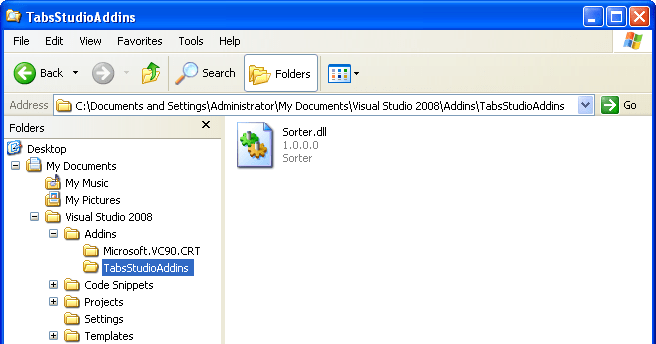
TabsStudioAddins directory along with TabsStudio.dll


Sorter add-in installed

Sorter add-in installed

Let’s see how Sorter is implemented. I used Visual Studio 2008 and C#. Project is based on C# class library template. References to EnvDTE and EnvDTE80 were added to use EnvDTE80.DTE2 dte parameter in OnConnection function. PresentationCore, PresentationFramework and WindowsBase were added to work with WPF controls. TabsStudioExt defines all Tabs Studio extensibility interfaces:
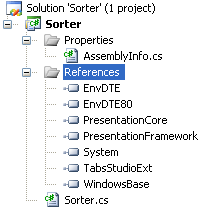
Sorter add-in solution structure

Sorter add-in solution structure


You may want to remove my custom post-build command from the project to successfully compile Sorter:
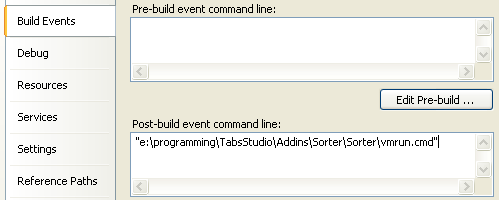
My custom post-build command

My custom post-build command


Whole add-in code is in Sorter.cs file. It is only 44 lines long.

Addin class should implement TabsStudioExt.ITabsStudioAddin interface:

namespace TabsStudioSorter
{
    public class Sorter : TabsStudioExt.ITabsStudioAddin
    {

On startup we hook TabCreated event:

        public void OnConnection(TabsStudioExt.ITabsStudioEngine engine, EnvDTE80.DTE2 dte)
        {
            engine.TabCreated += new TabsStudioExt.TabCreatedEventHandler(OnTabCreated);
        }

On shutdown we do nothing (though unhooking TabCreated event would be nice):

        public void OnDisconnection()
        {
        }

When new tab is created it is added to the end of tab panel. Following code scans existing tabs and finds a place to reinsert new tab in alphabetical order. GetTabNameWithoutPath function is used to compare only file name part of full tab name (p.s. newTabName initialization would be better moved out of foreach loop):

        private void OnTabCreated(object sender, TabsStudioExt.TabCreatedEventArgs e)
        {
            foreach (System.Windows.Controls.TabItem tabItem in e.TabPanel.Children)
            {
                string newTabName = GetTabNameWithoutPath(e.TabItem);
                if (tabItem != e.TabItem && 
                    System.String.Compare(GetTabNameWithoutPath(tabItem), newTabName, true) > 0)
                {
                    e.TabPanel.Children.Remove(e.TabItem);
                    e.TabPanel.Children.Insert(e.TabPanel.Children.IndexOf(tabItem), e.TabItem);
                    break;
                }
            }
        }

Following function returns tab name from TabItem. It uses Tabs Studio controls structure defined in the Specification part of the style documentation:

        private string GetTabName(System.Windows.Controls.TabItem tabItem)
        {
            System.Windows.Controls.DockPanel tabInternals = tabItem.Header as System.Windows.Controls.DockPanel;
            System.Windows.Controls.StackPanel tabNameGroup = tabInternals.Children[0] as System.Windows.Controls.StackPanel;
            System.Windows.Controls.Label tabName = tabNameGroup.Children[0] as System.Windows.Controls.Label;
            return tabName.Content as string;
        }

Following function strips path from tab name. E.g. for App_Code/Class1.cs title it returns Class1.cs:
Tabs Studio v1.5.4 is released

Filed under: Releases — Sergey Vlasov @ 6:38 am

Tabs Studio v1.5.4 is released – added add-ins support, changed default title splitting regex to handle dot in directory name, fixed VS tabs displacement after unloading Tabs Studio.

Tabs Studio Extensibility

Filed under: Uncategorized — Tags: — Sergey Vlasov @ 6:29 am

I’m working on an add-in infrastructure for Tabs Studio. I decided to start from writing several simple add-ins and then, based on this experience, form requirements for the Tabs Studio SDK. So, right now SDK is minimal and will change much in the future.

Tabs Studio add-in is a .NET dll that should be placed to the TabsStudioAddins subdirectory of Addins directory. If Tabs Studio was installed to C:\Documents and Settings\[user_name]\My Documents\Visual Studio 2008\Addins then add-in .dll should be copied to C:\Documents and Settings\[user_name]\My Documents\Visual Studio 2008\Addins\TabsStudioAddins directory.

Add-in class should implement TabsStudioExt.ITabsStudioAddin interface to be loaded by Tabs Studio at startup:

namespace TabsStudioExt
{
    public interface ITabsStudioAddin
    {
        void OnConnection(ITabsStudioEngine engine, EnvDTE80.DTE2 dte);
        void OnDisconnection();
    }
}

Only one add-in class per dll is allowed. TabsStudioExt interfaces are declared in the TabsStudioExt.dll that is installed along with the TabsStudio.dll.

TabsStudioExt.ITabsStudioEngine interface offers Tabs Studio methods and events that add-in can use for Tabs Studio customization. Right now it contains only single TabCreated event:

namespace TabsStudioExt
{
    public delegate void TabCreatedEventHandler(object sender, TabCreatedEventArgs e);

    public interface ITabsStudioEngine
    {
        event TabCreatedEventHandler TabCreated;
    }
}

TabCreatedEventArgs has TabItem and TabPanel properties. TabItem is an instance of System.Windows.Controls.TabItem that was just created. TabPanel is an instance of System.Windows.Controls.Primitives.TabPanel tab group for which tab was created.

EnvDTE80.DTE2 dte parameter in OnConnection method offers access to the Visual Studio extensibility model.

August 17, 2009

Dot in directory name

Filed under: Uncategorized — Sergey Vlasov @ 3:22 am

When tab title includes a directory and this directory has dot in the name, for example Folder.1/Class1.cs, then the default title splitting regex (?<Name>.+?)(?<Ext>\..+) splits it as Folder and .1/Class1.cs. A better regex for this case would be (?<Name>(.*/)?.+?)(?<Ext>\..+) that results in Fodler.1/Class1 and .cs. This regex is the new default starting from the next Tabs Studio version.

August 11, 2009

Tabs Studio v1.5.2 is released

Filed under: Releases — Sergey Vlasov @ 5:36 am

Tabs Studio v1.5.2 is released – fixed inability to install Tabs Studio when My documents directory points to a network share or when AlwaysInstallElevated policy is set on the computer.

August 10, 2009

Installing Tabs Studio to a different directory

Filed under: Uncategorized — Sergey Vlasov @ 6:16 am

By default Tabs Studio installs to a subdirectory in the user’s My Documents directory. You can install it to a different directory using following command:

msiexec /i TabsStudio_151.msi INSTALLLOCATION2008=c:\TabsStudio2008

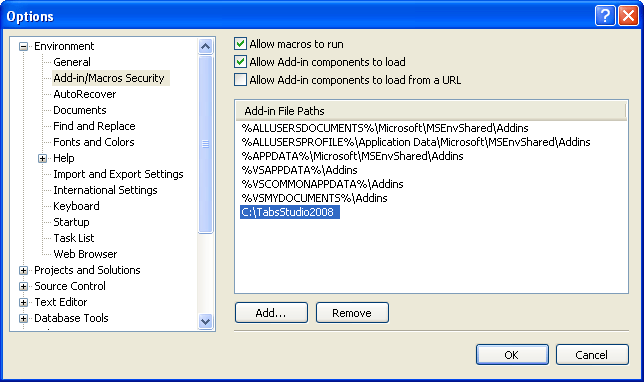
You also need to add this path to Visual Studio 2008 options:

Additional add-in file path for Tabs Studio installed to a different directory

Additional add-in file path for Tabs Studio installed to a different directory


To uninstall Tabs Studio from a different directory use following command:

msiexec /x TabsStudio_151.msi INSTALLLOCATION2008=c:\TabsStudio2008

To update Tabs Studio in a different directory with a new version use following command:

msiexec /i TabsStudio_152.msi INSTALLLOCATION2008=c:\TabsStudio2008

To install Tabs Studio for Visual Studio 2005 use INSTALLLOCATION2005 variable:

msiexec /i TabsStudio_151.msi INSTALLLOCATION2005=c:\TabsStudio2005

For Visual Studio 2010 Beta 1 it is more complex as in this case Tabs Studio uses additional helper extension installed by default to a subdirectory of LocalAppDataFolder.

« Newer PostsOlder Posts »

Blog at WordPress.com.