Tabs Studio Blog (organizing Visual Studio document tabs)

September 27, 2011

Visual Studio 11 Developer Preview support

Filed under: Uncategorized — Tags: — Sergey Vlasov @ 7:27 pm

I’ve added basic support for Visual Studio 11 Developer Preview – all tabs functionality that was available in VS 2010 is now available in VS 11.

The new preview tab is displayed as a normal tab, but you can see the blue under line when it is selected. To manually promote this tab you can use the Window menu and the keyboard shortcut (btw this screenshot was made on Windows 8):
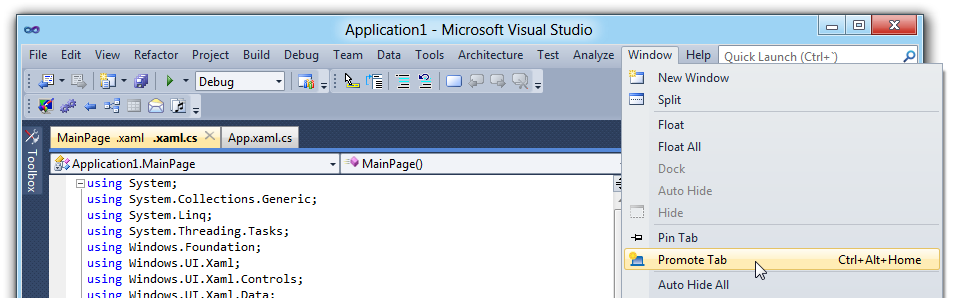
Promote preview tab command in Visual Studio menu

Promote preview tab command in Visual Studio menu

I don’t know how useful the preview tab will be. It can be turned off in Visual Studio options. On the other hand, floating tab groups are definitely useful and I will try my best to support them in a next release.

I noticed one new problem in VS 11 – tabs in a separate window can get light grey background inheriting style from a Visual Studio control up in the tree. To work around this, use the following custom style (it is the same example style that disables blue inactive tab background on mouse over):

<Style TargetType="TabsStudio:Tab" BasedOn="{StaticResource DefaultTabStyle}">
  <Setter Property="Template">
    <Setter.Value>

      <ControlTemplate TargetType="{x:Type TabsStudio:Tab}">
        <Border Background="{TemplateBinding Background}" Padding="5,1,5,1" 
                      BorderThickness="1,1,1,0" BorderBrush="Gray">
        <ContentPresenter Name="Content" ContentSource="Header"
              HorizontalAlignment="{Binding Path=HorizontalContentAlignment, 
                RelativeSource={RelativeSource AncestorType={x:Type ItemsControl}}}"/>
        </Border>
      </ControlTemplate>
    </Setter.Value>

  </Setter>
</Style>

Download link: Tabs Studio v2.5.0.

September 17, 2011

Document tabs in Visual Studio 11 Developer Preview

Filed under: Uncategorized — Tags: — Sergey Vlasov @ 3:51 pm

Visual Studio 11 Developer Preview was released this week:

Visual Studio 11 Developer Preview

Visual Studio 11 Developer Preview

Tabs can be pinned now and remain always visible – in the same row with normal tabs, in a separate row above normal tabs and in several rows above normal tabs:

Pinned tabs in a separate row above normal tabs

Pinned tabs in a separate row above normal tabs

Documents opened indirectly, e.g. when you hit a breakpoint in a new file, are displayed in a special preview tab. When you hit a next breakpoint in another new file, the preview tab displays the new file and “forgets” about the previous one. Thus reducing the number of open documents:

The blue preview tab during debugging

The blue preview tab during debugging

Floating documents can be grouped in a separate window and have tab groups within this separate window:

Floating document in a separate window with two vertical tab groups

Floating document in a separate window with two vertical tab groups

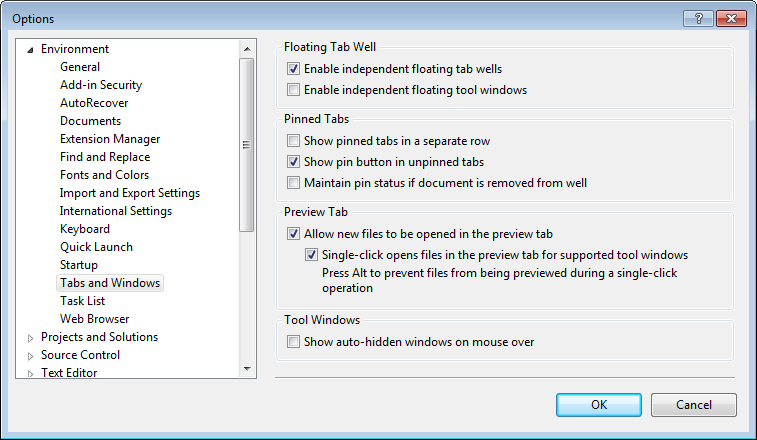
Several self-explanatory options are available to customize tabs and windows behavior:

Tabs and windows options

Tabs and windows options

I’ve managed to run Tabs Studio in the new IDE, but need more time to make a proper release:

Tabs Studio tabs in Visual Studio 11 Developer Preview

Tabs Studio tabs in Visual Studio 11 Developer Preview


Organize Visual Studio tabs with Tabs Studio add-in

August 16, 2011

Tabs Studio v2.4.5 released

Filed under: Releases — Sergey Vlasov @ 8:16 am

Tabs Studio v2.4.5 released: added the Close tooltip to the close tab button, fixed occasional change of selected extension in a tab in Visual Studio 2010 after switching to the full screen mode or starting a debug session.

Download link: Tabs Studio v2.4.5.

August 9, 2011

Tabs Studio v2.4.2 released

Filed under: Releases — Sergey Vlasov @ 10:52 am

Tabs Studio v2.4.2 released: unified tab layouts to Horizontal and Vertical, added tab movement animation support for the Vertical tabs layout.

Download link: Tabs Studio v2.4.2.

Unified layouts

Filed under: Uncategorized — Sergey Vlasov @ 10:46 am

After the introduction of the Stable tabs layout, Standard and Wrap became obsolete and I’ve finally removed them. I’ve also renamed Stable to Horizontal and Stack to Vertical:

Updated tabs layout option

Updated tabs layout option

Download link: Tabs Studio v2.4.2.

July 30, 2011

Tabs Studio v2.4.1 released

Filed under: Releases — Sergey Vlasov @ 8:33 pm

Tabs Studio v2.4.1 released:

  • Added the ability to export and import Tabs Studio settings.
  • Added the ability to highlight tabs with different colors to the Marker add-in.
  • Added the Re-sort tabs tab context menu command to the Sorter add-in.
  • Added Disable Tabs Studio option reset on reinstallation.
  • Changed the unfocused selected tab background in VS 2010 to be more prominent.

Download link: Tabs Studio v2.4.1.

Import and export settings

Filed under: Uncategorized — Sergey Vlasov @ 8:21 pm

I’ve added the ability to export and import Tabs Studio settings for backup purposes and to copy Tabs Studio settings to another computer:

Export settings and Import settings buttons

Export settings and Import settings buttons

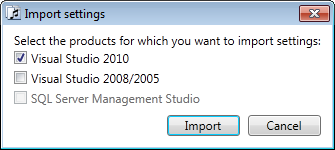
Tabs Studio keeps separate settings for VS 2010, VS 2008 and SSMS. If you use several products, export saves all settings and the additional dialog lets you select which settings you want to import:

Products selection for settings import

Products selection for settings import

Settings are stored in a .tssettings zip file and mirror the directory structure of settings in “c:\Users\[username]\AppData\Roaming\Sergey Vlasov”.

Download link: Tabs Studio v2.4.1.

July 25, 2011

Favorite Documents

Filed under: Uncategorized — Tags: — Sergey Vlasov @ 9:42 am

If you often work on different parts of an application with different groups of document tabs opened, you may find my new Favorite Documents extension helpful:

Favorites menu in Visual Studio 2010

Favorites menu in Visual Studio 2010

Favorite Documents lets you create links to frequently used code files and then quickly open them as a group or individually from the Favorites menu in Visual Studio 2010.

Home page: Favorite Documents.
Direct download link: Favorite Documents v1.0.

July 17, 2011

Highlighting palette

Filed under: Uncategorized — Tags: , — Sergey Vlasov @ 8:38 pm

I’ve added the ability to highlight tabs with different colors from Tabs Studio context menu:

Highlighting colors in Tabs Studio context menu

Highlighting colors in Tabs Studio context menu


If you use just one color (still accessible with Ctrl+Click), but want to change it, the custom style is slightly different now (note the new HighlightIndex property):

<Style TargetType="TabsStudio:TabInternals" BasedOn="{StaticResource DefaultTabInternalsStyle}">
    <Style.Triggers>
      <DataTrigger Binding="{Binding Path=(TabsStudioMarker:Properties.HighlightIndex),
                 RelativeSource={RelativeSource AncestorType=TabsStudio:Tab}}" Value="1">
          <Setter Property="Background">
              <Setter.Value>
                   <LinearGradientBrush StartPoint="0,0" EndPoint="0,1">
                       <GradientStop Color="Transparent" Offset="0.9"/>
                       <GradientStop Color="Green" Offset="0.9"/>
                   </LinearGradientBrush>
              </Setter.Value>
          </Setter>
      </DataTrigger>
  </Style.Triggers>
</Style>

In this Marker update I’ve also removed a small gradient transition in underline, fixed occasional loss of first tab highlighting after loading a solution in VS 2010, slightly changed highlight commands placement in the context menu.

Download link: Marker v1.0.4.

June 12, 2011

Tabs Studio v2.4.0 released

Filed under: Releases — Sergey Vlasov @ 3:39 pm

Tabs Studio v2.4.0 released – disabled animation for very small tab movement, disabled tab movement animation when the SingleRow add-in is used.

Download link: Tabs Studio v2.4.0.

« Newer PostsOlder Posts »

Blog at WordPress.com.