Tabs Studio Blog (organizing Visual Studio document tabs)

December 13, 2011

Tabs Studio v2.6.0 released

Filed under: Releases — Sergey Vlasov @ 10:06 pm

Tabs Studio v2.6.0 released: enabled separate add-in settings for SSMS 2008 and VS 2008, included add-in settings to export/import settings, fixed add-ins restart (for example, SingleRow crashed after import settings restart).

Download link: Tabs Studio v2.6.0.

Add-in settings

Filed under: Uncategorized — Tags: — Sergey Vlasov @ 9:57 pm

I’ve added more organization to add-in settings storage and activation configuration.

Previously add-ins stored global settings in the add-ins directory near the binary files. Now I’ve added the GetAddinSettingsDirectory method to the ITabsStudioEngine interface providing a directory near general Tabs Studio settings. It makes possible to have separate add-in settings for SSMS 2008 and Visual Studio 2008.

Previously all .dll add-ins from the add-ins directory were loaded at startup. Now the list of active add-ins is stored near general Tabs Studio settings. You control this list as usual from Add-in Manager. It again makes now possible to have separate active add-ins for SSMS 2008 and Visual Studio 2008.

Export/import settings now save and restore all add-in settings as well.

Download link: Tabs Studio v2.6.0.

November 28, 2011

Tabs Studio v2.5.7 released

Filed under: Releases — Sergey Vlasov @ 10:14 pm

Tabs Studio v2.5.7 released: added the ability to sort tabs by project and extension to the Sorter add-in, fixed tabs reset when Windows theme is changed with Visual Studio 2010 running.

Download link: Tabs Studio v2.5.7.

Sorting by project and extension

Filed under: Uncategorized — Tags: — Sergey Vlasov @ 10:10 pm

I’ve added the ability to sort tabs by project and extension:

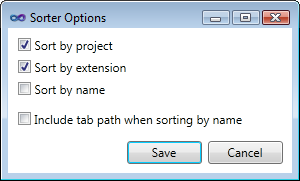
Sorter Options

Sorter Options


A tab can have several extensions. To simplify sorting by extension behavior, only the first extension present on tab creation is used for sorting. You can select the Re-sort tabs context menu command to reset it.

For example, if Sorter is set up to sort only by extension and you open Form1.cs [Design] and stdafx.h:

Sorting by extension

Sorting by extension


Now you open stdafx.cpp. The stdafx tab keeps second position because “only the first extension present on tab creation is used for sorting” – in our case .h:
Order not changed when a new extension is added

Order not changed when a new extension is added


But if we Re-sort tabs, then .cpp becomes the primary extension for the stdafx tab and it moves before Form1:
Re-sorted tabs

Re-sorted tabs


Please, let me know if you find sorting by extension actually useful for your work 🙂

The updated Sorter add-in is included in Tabs Studio v2.5.7.

November 17, 2011

Tabs Studio v2.5.6 released

Filed under: Releases — Sergey Vlasov @ 8:31 am

Tabs Studio v2.5.6 released:

  • Added the Sort including path in the tab name option to the Sorter add-in.
  • Fixed failure to load the AvalonStyleEditor add-in on localized Visual Studio editions.
  • Fixed loss of the previously selected tab state in SSMS when opening a new tab with tab grouping enabled.
  • Removed separate tabs tool window activation each time debugging starts in Visual Studio 2010 and fixed a rare crash when making this window visible.

Download link: Tabs Studio v2.5.6.

Sorting by full tab name

Filed under: Uncategorized — Tags: — Sergey Vlasov @ 8:12 am

Depending on the project type you are working on, Tabs Studio settings and add-ins enabled, tabs may have a path in the tab name. The Sorter add-in compares tab names without path, so for an ASP.NET website project, tabs are sorted like this:

Sorting without path

Sorting without path


I’ve added the option to sort by full tab name. You can enable it in Tabs Studio – Add-in manager – Sorter options:
Sorter Options

Sorter Options


With this option enabled the same tabs are now sorted like this:
Sorting with path

Sorting with path


The updated Sorter add-in is included in Tabs Studio v2.5.6.

October 18, 2011

Tabs Studio v2.5.5 released

Filed under: Releases — Sergey Vlasov @ 7:21 pm

Tabs Studio v2.5.5 released:

  • Added the PriorityGroup add-in.
  • Added the LessRowsPriority property to customize tab layout.
  • Fixed an occasional tabs reorder in VS 2010 when starting a debug session introduced with Tabs Studio v2.4.5.
  • Fixed loss of highlighting for a tab moved to another group.
  • Fixed tab moving to a row with not enough row buffer.
  • Fixed an internal XamlParseException visible when debugging your own Visual Studio add-in.

Download link: Tabs Studio v2.5.5.

Less rows priority

Filed under: Uncategorized — Tags: — Sergey Vlasov @ 8:50 am

Sometimes you get tabs arranged in more rows than necessary:

Tabs in 4 rows

Tabs in 4 rows


The same tabs in 3 rows

The same tabs in 3 rows

This is because the current tab layout algorithm first of all tries to minimize distracting tab movement between rows (keeping tab in the last position, reserving a row buffer for new tabs and changes in tab width).

I’ve added the new LessRowsPriority property to let you customize this behavior. (Remember also the RowBuffer property.) The larger LessRowsPriority value the more actively Tabs Studio will try to minimize number of rows. It is a double with default value of 1. Value of 10 is kind of high priority and value of 100 – very high priority. You can set it in a custom style like this:

<Style TargetType="TabsStudio:Tabs" BasedOn="{StaticResource DefaultTabsStyle}">
  <Setter Property="LessRowsPriority" Value="10"/>
</Style>

October 17, 2011

Priority group

Filed under: Uncategorized — Tags: — Sergey Vlasov @ 10:32 pm

If you have a frequently accessed tab that is open for a long time, you may want to position it at the beginning of the list for easier access and better tabs organization. The new PriorityGroup add-in lets you add such tab to the priority group and will keep it at the beginning when this tab is open:
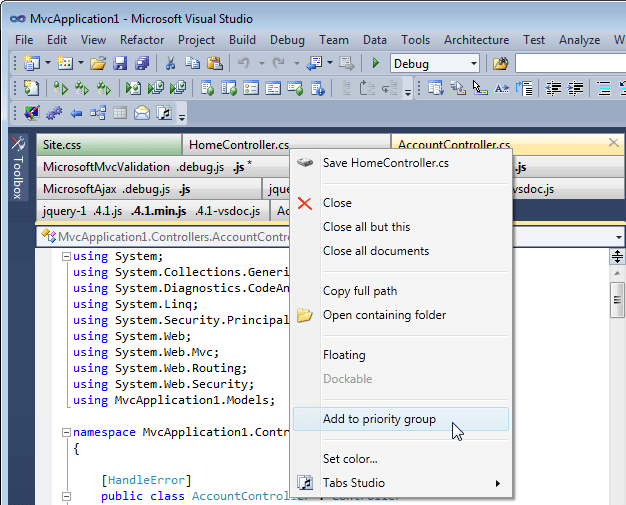
Adding a tab to the priority group

Adding a tab to the priority group

Priority tabs are identified by tab name and work globally across all solutions. To remove a tab from the priority group, right click on the tab and select Remove from priority group.

You can color priority tabs using the new TabsStudioPriorityGroup:Properties.Top property. For example, in the standard Tab Coloring Rule dialog, add the following custom condition:

<Condition Binding="{Binding Path=(TabsStudioPriorityGroup:Properties.Top),
  RelativeSource={RelativeSource Self}}" Value="True"/>
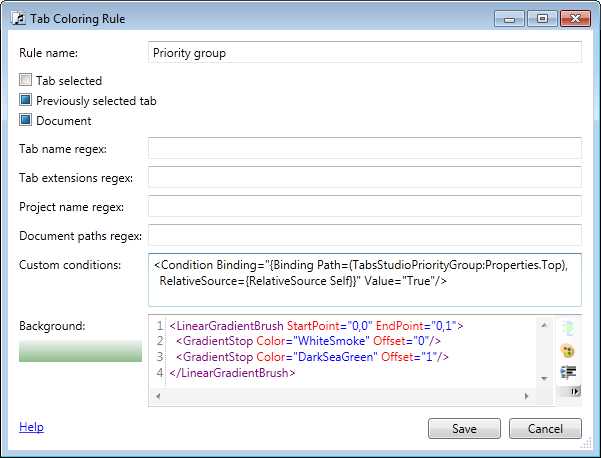
A tab coloring rule for priority tabs

A tab coloring rule for priority tabs

The Sorter add-in now recognizes if PriorityGroup is running and sorts priority tabs first:

Sorter and PriorityGroup sort and prioritize tabs

Sorter and PriorityGroup sort and prioritize tabs

PriorityGroup will be included in the next Tabs Studio release.
September 27, 2011

Tabs Studio v2.5.0 released

Filed under: Releases — Sergey Vlasov @ 7:40 pm

Tabs Studio v2.5.0 released: added basic support for Visual Studio 11 Developer Preview, fixed uninstallation of CloseAllButThisTab and EmailSupport commands.

Download link: Tabs Studio v2.5.0.

« Newer PostsOlder Posts »

Blog at WordPress.com.



