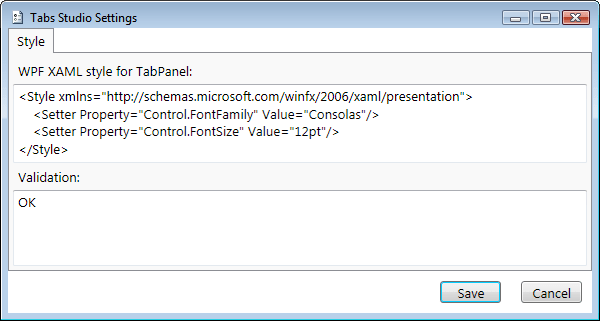
I’ve updated styling code to allow more customization. To change global tabs font family and font size you should now use the following format:

Style resources settings
The result is the same as in the previous post:

Default tabs style

Custom tabs style
More customization means that now you can, for example, set Italic font style only for the selected tab name:
<ResourceDictionary xmlns="http://schemas.microsoft.com/winfx/2006/xaml/presentation"
                 xmlns:TabsStudio="clr-namespace:TabsStudio;assembly=TabsStudio">
<Style TargetType="TabsStudio:TabNameLabel">
    <Style.Triggers>
        <Trigger Property="IsTabSelected" Value="True">
            <Setter Property="Control.FontStyle" Value="Italic"/>
        </Trigger>
    </Style.Triggers>
</Style>
</ResourceDictionary>
The result is:

Custom selected tab name
Notice how the not selected tab name and extensions on the selected tab stay in the normal font style.


 Tabs Studio Blog (organizing Visual Studio document tabs)